
Help Desk Software Comparison: A 2026 Ops Guide
Support leaders usually start a help desk software comparison when the team is already feeling pain. The inbox is overloaded. Escalations bounce between agents. Customers have direct email addresses or calendar links for specific reps and use them to skip the queue. Managers spend more time patching process gaps than improving service.
That situation doesn't mean the team is failing. It usually means the toolset no longer matches the operating model.
Most comparison guides make that worse. They line up logos, feature checkboxes, and entry pricing, then act like the decision is simple. It isn't. The key question isn't which platform has ticketing, macros, and a chatbot. Instead, the question is which platform will hold process together when volume rises, staffing changes, and support cases move across teams.
| Help desk archetype | Best fit | Strengths | Weak spots | Watch for |
|---|---|---|---|---|
| All-in-one enterprise suite | Large, regulated, multi-team operations | Deep workflow control, stronger governance, broad reporting | Longer rollout, heavier admin load, slower changes | Hidden implementation effort |
| Lean SMB starter | Small teams that need fast setup | Simple UI, lower friction, quick adoption | Limited routing depth, weaker permissions, lighter analytics | Outgrowing it within a year or two |
| API-first modern platform | Technical teams with custom workflows | Flexibility, extensibility, cleaner integrations | More design work required, not always turnkey | Internal ops burden shifting to admins |
| Shared inbox disguised as a help desk | Very early-stage teams only | Fast to launch | Weak triage, weak accountability, poor escalation handling | Ticket ownership chaos |
| Help desk plus specialist scheduler | Teams that need secure support calls | Better queue control, cleaner handoffs, less calendar leakage | Two-system design to manage | Integration and ownership clarity |
Choosing Your Next Help Desk Is More Than a Feature Checklist
A lot of teams buy the wrong platform because they shop for software the same way they shop for a browser extension. They compare surface features instead of operating consequences. That mistake gets expensive fast.
The market itself shows how central these platforms have become. The global help desk software market was valued at USD 14.3 billion in 2025 and is projected to reach USD 35.0 billion by 2035, with a CAGR of 9.4%, according to Future Market Insights' help desk software market analysis. That growth says two things. Companies know support infrastructure matters, and many of them are still buying tools that don't solve the messy parts of support operations.
Buying software versus buying process control
A mature help desk doesn't just collect tickets. It controls intake, assignment, escalation, visibility, and accountability. It protects the team from side channels that break workflow. It gives managers a reliable record of who touched what, when, and why.
A weak platform does the opposite. It creates workarounds.
Support teams then end up with problems like these:
- Escalations without ownership: Tickets move between teams, but nobody owns the clock.
- Private side channels: Customers message agents directly because the official path feels slow.
- Admin sprawl: Basic queue changes require too many manual updates.
- Reporting theater: Dashboards look polished, but they don't explain where work stalls.
Most failed help desk rollouts don't fail because ticketing is missing. They fail because the tool doesn't enforce how the team is supposed to work.
What a serious comparison should answer
A useful help desk software comparison should test whether the platform can support real operating pressure.
That means asking practical questions. Can it route by skill, urgency, and team responsibility? Can it survive shift changes without tickets getting stranded? Can managers tighten permissions without making the system unusable? Can the team add channels and workflows without hiring a full-time internal architect?
The strongest buying decisions usually come from support leaders who stop asking, "What features are included?" and start asking, "What bad behavior does this tool prevent?"
Core Criteria for a Scalable Support Operation
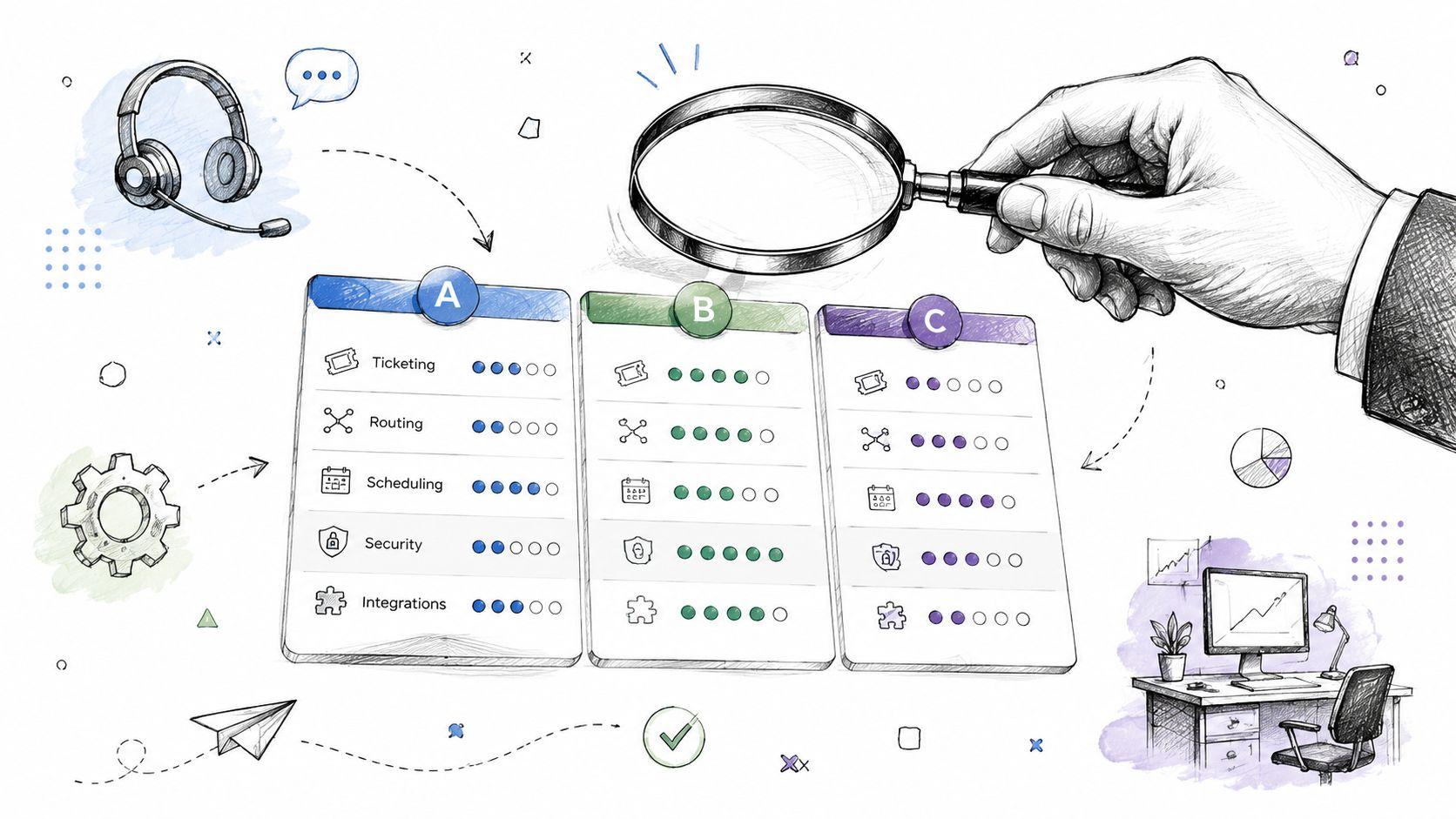
Before comparing brands, a team needs a scorecard that reflects daily work. Otherwise, demos become a contest in polished UI and vendor scripting.
The visual below captures the core areas worth pressure-testing first.

Reliability and user experience
A help desk can have every enterprise badge in the world and still fail if agents avoid using it. The fastest way to kill adoption is to make the tool slower than the inbox it replaced.
Look for a platform that keeps the main path simple. Agents should be able to open a ticket, see context, collaborate, and hand off work without jumping through layers of tabs. Customers should also get a clean intake experience. Teams refining that intake flow can discover Formzz's guide to ticketing for a useful breakdown of what structured request capture should accomplish.
A related checkpoint is how the system behaves under stress. A good platform stays readable when queues are busy. It doesn't bury priority, SLA state, or assignment history.
Integration model and workflow flexibility
Integrations aren't just nice add-ons. They determine whether support works from one operating system or from a patchwork of tabs.
The best platforms connect cleanly to CRM systems, engineering tools, identity systems, and collaboration tools. The risky ones force teams into brittle workarounds or upsell basic connectivity. A strong support ticket system evaluation checklist should include how extensively the platform can act on external data, not just display it.
Questions worth asking in demos include:
- Routing logic: Can rules use account data, product tier, or case history?
- Workflow depth: Can the system handle multi-stage escalation, not just first assignment?
- Permission design: Can access be narrowed by team, role, or case type?
- Change management: Can admins update logic safely without breaking production workflows?
Practical rule: If a vendor can't show how routing changes are made, tested, and governed, the team is buying future admin pain.
Analytics and administrative overhead
Reporting should help managers fix operations, not just decorate QBR slides. Useful analytics expose backlog age, transfer patterns, SLA risk, and recurring failure points in handoffs.
Administrative overhead matters just as much. Some tools look affordable until every new queue, form, or permission change requires specialist attention. That's where support leaders get trapped. The platform becomes one more system the team serves, instead of the system serving the team.
A scalable support operation needs both. Good visibility for managers, and low-friction administration for the people maintaining the workflow.
Help Desk Feature Matrix Showdown
Feature checklists flatten important differences. Three platforms can all claim automation, omnichannel support, and analytics while delivering very different results in practice.
The fastest way to compare is by archetype, not logo.

Side-by-side comparison
| Capability | All-in-one enterprise suite | Lean SMB starter | API-first modern challenger |
|---|---|---|---|
| Ticketing and workflow automation | Strong for complex approvals, escalations, and governance | Good for straightforward triage and queueing | Strong if the team will design its own logic |
| Multi-channel intake | Broad channel support with more policy control | Usually easy to launch, but less nuanced | Flexible, depends on implementation choices |
| Reporting and analytics | Best for cross-team operational visibility | Fine for basic team dashboards | Strong when paired with custom data work |
| SLA management | Usually the most mature | Often adequate, but simpler | Can be powerful, but setup quality matters |
| Permissioning | Detailed and enterprise-friendly | Often coarse | Flexible, but work-intensive |
| Time to value | Slowest | Fastest | Variable |
| Admin burden | Highest | Lowest at first | Medium to high |
| Best for | Regulated or large multi-team support | Smaller teams without a dedicated admin | Technical orgs that want control |
Where automation quality really diverges
A lot of vendors say "automation" when they mean basic assignment rules and canned triggers. That helps, but it isn't enough for larger support models.
What matters is whether the engine can reflect real operating logic. Can it route based on account type, issue class, and business hours? Can it escalate differently by queue? Can it hand work across support, product, and engineering without losing context?
According to SaaSworthy's help desk automation statistics, companies using help desk automation save up to 670 hours annually per team, and 22% of support tickets are resolved without human involvement as of 2026. Those numbers make the case for automation. They don't prove every automation module is equal.
Better automation doesn't mean more rules. It means fewer manual decisions at the points where work usually gets stuck.
Reading the trade-offs correctly
The enterprise suite usually wins on control. It can support stricter workflows, stronger auditability, and broader coordination. The cost is speed. Small changes can require process design, admin support, and more testing than a lean team wants.
The SMB starter usually wins on adoption. Agents learn it quickly, managers launch fast, and the team gets immediate relief from shared inbox chaos. The trade-off appears later, when queue logic gets more complex and permissions need to tighten.
The API-first challenger can be the best fit for technical organizations that hate platform rigidity. But flexibility isn't free. Someone still has to define fields, manage integrations, own workflow changes, and prevent custom logic from becoming its own maintenance problem.
Teams doing product-specific research may also want to compare Zendesk alternatives to see how common category leaders stack up against other approaches.
Calculating the True Cost of Your Help Desk
Per-agent pricing is the number vendors want buyers to remember. It isn't the number finance should care about most.
The expensive part often shows up after signature. Admin setup, migration work, permissions design, training, workflow cleanup, and ongoing maintenance don't sit neatly on the pricing page. They still hit the budget.
Subscription cost versus operating cost
Many help desk software comparison articles fall short by comparing list prices and ignoring the labor needed to make the system usable.
According to Xurrent's review of help desk solutions, implementation, training, and administration costs can reach up to 2–3x the annual subscription in complex enterprise deployments, and 68% of organizations underestimate TCO by at least 40%. That should reset how any support leader builds a business case.
Budget warning: A cheaper help desk can become the more expensive option if it shifts too much configuration and admin work onto the internal team.
A simple three-year TCO model
A practical model should include more than licenses. It should capture all the work required to launch and run the platform.
| Cost Factor | Tool A ($15/agent/mo) | Tool B ($29/agent/mo) |
|---|---|---|
| Subscription | Lower visible software fee | Higher visible software fee |
| Implementation effort | Often heavier if basic features require workaround design | May be lower if needed functions exist natively |
| Data migration | Can require more manual cleanup | Can still be painful, but sometimes more structured |
| Training | Lower at first if the UI is simple | Higher if the platform is broader |
| Ongoing administration | Can rise quickly if reporting, routing, and permissions are limited | May stabilize if governance tools are stronger |
| Integration overhead | Extra tools or paid connectors may be needed | Broader built-in options may reduce patchwork |
| Three-year risk | Cheap on paper, expensive in labor | Higher commitment, but potentially lower operational drag |
That table isn't meant to hand out a winner. It's meant to stop a bad buying habit. Sticker price is only one line item.
What finance and support should review together
A good internal review usually includes:
- Setup ownership: Who configures forms, queues, automations, and permissions?
- Migration realism: How much historical data needs to move?
- Admin tax: Which team will maintain the platform after launch?
- Upgrade traps: Are key integrations or controls locked behind higher tiers?
- Support model fit: Does the tool match how the team already works, or force a redesign?
Teams comparing software cost structures alongside scheduler decisions can also review Headset Army pricing as a clean example of how transparent packaging reduces procurement friction.
Matching the Tool to Your Team Use Case
The wrong help desk often comes from buying for aspiration instead of reality. A five-person team buys an enterprise suite because it looks "future-proof." A regulated company buys a lightweight tool because the demo felt clean. A global support team buys a platform that can't handle handoffs.
The better approach is to match the category to the operating environment.

Small team with no dedicated admin
This team needs speed, simplicity, and low maintenance. Usually, support is being run by a manager who also owns documentation, escalations, and maybe onboarding. That team doesn't need a sprawling platform.
A lean SMB tool usually fits best when the priorities are:
- Fast rollout: The team needs order now, not after a long implementation.
- Low training burden: New agents should be productive quickly.
- Basic but reliable automation: Assignment, tagging, and SLA reminders matter more than elaborate orchestration.
The trade-off is future complexity. If the team expects multiple queues, advanced permissions, or close support-engineering coordination soon, it should test that path before buying.
Regulated enterprise with audit and access requirements
This team should optimize for control, not convenience. Customer support might overlap with security, legal, or compliance review. Ticket history and permissions matter as much as response flow.
A broader enterprise suite is usually the safer fit when the team needs stronger governance around:
- role-based access
- detailed audit trails
- approval flows
- controlled workflow changes
The trade-off is heavier administration. Leaders should assume more configuration discipline, more internal ownership, and slower change cycles.
The best enterprise tool isn't the one with the most features. It's the one that lets the organization enforce policy without creating daily friction for agents.
Distributed support team with rotating shifts
Many comparisons lack depth regarding the specific requirements of a globally distributed team. Such a team necessitates more than just ticketing; it demands clean handoffs, consistent coverage, and routing that remains functional across shifting schedules.
An API-first or more flexible platform often performs better here if the team can design around:
- Queue continuity: Work shouldn't belong to one person longer than necessary.
- Skill-based triage: Specialized issues need predictable routing.
- Cross-region collaboration: Agents need context fast when inheriting work.
The trade-off is design effort. If the tool is flexible but the workflow isn't thought through, shift-based support turns messy fast. Tickets end up technically assigned but operationally orphaned.
The Critical Scheduling Gap in Most Help Desks
Most help desks handle asynchronous work reasonably well. The gap appears when a case needs a live conversation.
That's where native scheduling features often break down. They tend to be built around individual calendars, not team-based support coverage. That sounds minor until customers start booking directly with specific agents, bypassing intake rules and exposing private contact paths.

Why native scheduling creates operational problems
A standard booking link works fine for sales. It works badly for support.
Support teams need control over who gets the call, when that assignment happens, and what happens if coverage changes. Native scheduling usually misses those requirements. It often creates these problems:
- Queue bypass: Customers save a direct booking link and skip triage.
- Agent exposure: Personal calendars, direct addresses, or direct meeting links leak outside official channels.
- Fragile coverage: If the assigned rep is unavailable, rerouting becomes manual.
- Poor team balancing: Scheduling attaches to a person, not to a capability or queue.
A support operation with compliance sensitivity also needs to think beyond convenience. Leaders working through outreach and scheduling constraints can review TCPA, HIPAA, and FDCPA scheduling compliance to understand why informal booking practices become risky.
What teams actually need instead
Support scheduling works better when the system routes to the function first and the person later. That means scheduling against a capability, preserving agent privacy, and allowing fallback when staffing changes.
The strongest team-first scheduling setups usually include:
- Single-use booking links: One booking, then expiration
- Delayed assignment: The system chooses the specific agent closer to the meeting time
- Fallback routing: Another qualified team or queue can absorb the appointment
- Protected meeting access: Direct call details stay hidden until the right moment
Teams exploring alternatives to generic schedulers can review best scheduling programs for support organizations to see how specialist tools differ from standard calendar products.
When support calls are part of escalation handling, scheduling can't be treated like a personal productivity feature. It's part of queue management.
Planning Your Migration and Final Decision
Even a strong platform choice can fail on rollout. Migration work usually breaks when leaders rush procurement, skip workflow testing, or assume agents will adapt on the fly.
A safer approach is disciplined and boring. That's a good thing.

A practical rollout checklist
- Define the operating model first: Document queues, escalation paths, permissions, SLA rules, and reporting needs before the vendor configures anything.
- Run a controlled pilot: Use a small team, a real queue, and real ticket volume. Demo success doesn't predict production success.
- Trim migration scope: Move the data the team will use. Dragging every legacy artifact into the new system creates cleanup work.
- Train managers and admins separately: Agents need execution training. Managers need workflow and reporting training. Admins need governance training.
- Plan go-live ownership: Decide who handles defects, rule changes, and user questions in the first weeks after launch.
- Review after launch: Watch transfer rates, backlog age, and escalation friction. Those signals reveal whether the process is holding.
The best help desk software comparison ends with fewer assumptions, not more. If a tool can't support the team's real workflow, real staffing model, and real cost structure, it isn't the right tool, no matter how polished the demo looked.
Support teams that need tighter control over escalation scheduling should look at Headset Army. It's built for team-based support environments where direct calendar exposure, queue bypass, and brittle handoffs create unnecessary risk.