
Boost CSAT: Best Customer Support Scheduling Software 2026
Most advice about customer support scheduling software is wrong.
It tells support teams to copy sales workflows. Put a calendar on a page. Let customers pick a time. Sync it to Google Calendar or Outlook. Add round robin if the team is bigger than one person. That advice creates a mess in support.
Support isn't a personal booking business. It's a controlled service operation. The goal isn't to expose availability. The goal is to route the right issue to the right capability without letting customers bypass the system.
That distinction matters more now because the underlying software categories are expanding fast. The appointment scheduling software market is valued at USD 14.33 billion in 2024 and is projected to reach USD 46.96 billion by 2035 at a 11.39% CAGR, according to Market Research Future's appointment scheduling software market report. More tools will keep showing up. Most still won't be designed for support.
Early comparison helps separate real support tools from dressed-up sales schedulers.
| Feature | Purpose-built support scheduler | Generic team scheduler |
|---|---|---|
| Booking target | Team capability or queue | Individual or visible team member |
| Link control | Single-use, controlled access | Reusable links that get shared |
| Agent privacy | Calendar hidden from customer | Calendar exposure is common |
| Fallback coverage | Automated across shifts and teams | Manual reassignment or simple round robin |
| Escalation handling | Supports tiered routing | Treats every booking like a meeting |
| Queue protection | Preserves official support path | Customers can bypass intake |
| Workload balancing | Just-in-time assignment | Static assignment logic |
| Best fit | Support, escalations, technical calls | Sales demos, consultations, simple appointments |
Why Generic Schedulers Create Support Chaos
Generic schedulers break support because they assume the customer should choose a person. Support teams should reject that premise.
A customer with a broken integration, a billing failure, or a reproduction call for a bug doesn't need Agent Sam's Tuesday calendar. That customer needs access to a support capability under controlled rules. When a tool exposes individual availability, it stops being a routing layer and starts being a side door into the operation.
The damage isn't theoretical. A 2025 study by the Customer Support Institute found that 68% of enterprise support teams experienced direct-dial link leakage after using generic schedulers, correlating with a 22% drop in escalation containment rates, as cited by Assembled's page on support team scheduling software. Once those links spread, the queue loses control.

Calendar visibility is the real problem
Most software buyers get distracted by convenience features. Calendar sync. Reminders. Buffers. Availability windows. None of that fixes the core support risk.
The problem is calendar visibility plus persistent access. Customers bookmark links. Forward them internally. Reuse them after the original case is closed. Escalations that should move through a managed queue get redirected to whoever happened to own the first meeting.
Support teams shouldn't publish agent availability. They should publish controlled access to a support function.
That's why generic “team scheduling” still fails. Team views often sit on top of individual calendars. The customer still sees too much, or the system still assigns too early, or both. In a support organization with rotating shifts, handoffs, and specialist tiers, that design causes constant cleanup work.
Queue bypass hurts operations and morale
Queue bypass doesn't just create customer experience issues. It distorts staffing.
Managers look at queue metrics and think coverage is stable, while agents are unofficially handling side-channel meetings that never entered the official workflow. Tickets lose context. Capacity planning gets weaker. Workload becomes political because the people with leaked links get flooded while everyone else waits for routed work.
A support leader trying to clean this up should also look at the phone layer, because the same control problem shows up in voice systems. ConnectCX's phone system guide is useful here because it breaks down how inbound support should flow through controlled channels instead of direct, unmanaged contact paths.
Three common failure modes show up again and again:
- Bookmarked direct access that lets customers skip triage and land on the same agent repeatedly.
- Uneven workload distribution because “popular” agents get overused while less visible agents sit idle.
- Escalation leakage when technically complex or sensitive calls never return to the queue for proper tracking.
Generic scheduling advice keeps pointing teams the wrong way
A lot of published advice still tells support leaders to start with ordinary calendar software and basic appointment tools. That's exactly backwards for teams handling escalations and technical work.
Even a well-meaning guide to Google Calendar appointment scheduling can only solve the mechanics of booking. It doesn't solve support-specific routing, link containment, privacy, or fallback coverage. Those are operating model problems, not calendar problems.
Practical rule: If a scheduler starts by asking which person should be bookable, it was probably built for sales, consulting, or recruiting. Support should start by asking which capability should be reachable.
Support leaders should treat customer support scheduling software as part of the service control plane. If it leaks calendars, encourages direct dialing, or lets customers jump the queue, it's not helping. It's sabotaging the system.
The Five Core Features of Purpose-Built Support Schedulers
A support scheduler doesn't need more cosmetic settings. It needs stronger operational controls.
The gap in the market is obvious. A 2024 SaaS Operations Report revealed that 74% of support managers rejected generic schedulers due to "calendar hijacking" and "queue bypass," yet no mainstream guide offers a solution that assigns to a team capability with dynamic, just-in-time agent fallback, as described in RingCentral's customer service software platform article.
That rejection makes sense. Most generic tools only polish the same broken model.

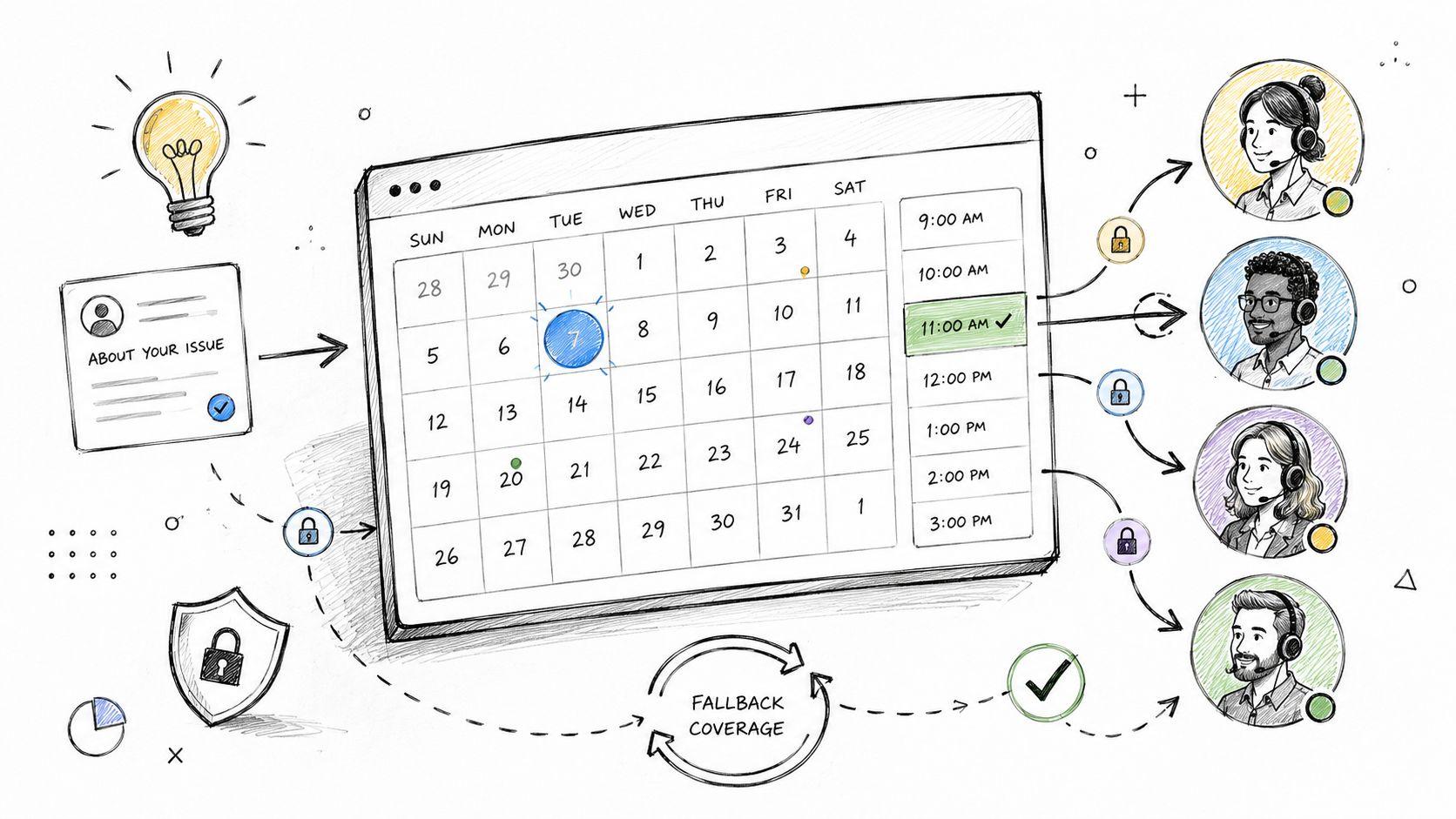
Secure single-use links
A reusable booking link is a support liability.
Support teams need links that expire after one booking or after a short controlled window. That stops customers from treating a case-specific path like a permanent hotline. It also reduces the chance that someone forwards an old meeting link to a colleague who was never part of the original issue.
A good scheduler should let agents send access for a specific case without creating a standing invitation to bypass intake forever.
Team-level targeting instead of person-level booking
This is the dividing line between support software and sales software.
A customer shouldn't book “Dana from Tier 2.” The customer should book database escalation, SSO troubleshooting, or billing recovery. The system should translate that capability into an actual person later, based on coverage and current conditions.
That design preserves continuity without exposing the internal org chart. It also protects the team when someone changes shifts, goes on leave, or gets pulled into another incident.
Automated fallback and shift coverage
Manual reassignment is where support scheduling breaks down.
A real support tool needs fallback rules that trigger when the first assigned person becomes unavailable. The system should move the booking to another qualified agent or team under policy, not wait for a manager to notice a conflict. This matters most in distributed teams, rotating schedules, and follow-the-sun environments.
A generic scheduler usually stops at “someone booked the slot.” A support scheduler has to answer a harder question. What happens if that person can't take the case anymore?
Dynamic just-in-time assignment
Round robin sounds fair. It often isn't.
If the tool assigns the agent too early, the team loses flexibility. Workload changes. Incidents appear. Sick leave happens. A call that looked simple when booked turns into a specialist case by the time it starts. Static assignment locks the team into outdated assumptions.
The right model defers the person-level choice until close to the meeting, when the system has the best picture of capacity and qualification.
That's why just-in-time assignment matters. It balances work in real conditions, not in yesterday's calendar snapshot.
Secure waiting rooms and hidden meeting details
Support teams should stop sending direct meeting URLs and personal contact details in every confirmation message.
A branded waiting room protects the handoff. The customer gets a controlled place to join. The actual meeting details only appear at the right time. That keeps direct Zoom links, email addresses, and other contact details from turning into long-term bypass channels.
This is one area where support leaders can learn from adjacent categories. A review of appointment scheduling features is useful because it shows how mainstream scheduling tools think about booking workflows. But support teams should go further and insist on privacy controls those general tools often treat as optional.
The five features in one operating model
These features matter because each one closes a specific failure path:
- Single-use links stop repeated unauthorized booking.
- Capability-based targeting keeps customers out of agent calendars.
- Automated fallback protects coverage during shift changes and absences.
- Just-in-time assignment balances work under real-time conditions.
- Secure waiting rooms hide direct access details until they're needed.
Customer support scheduling software should be judged on control, not on how quickly it can publish a calendar page. If the product can't prevent queue bypass, contain access, and adapt when staffing changes, it's not built for support.
How to Evaluate and Choose the Right Scheduling Software
Start with the failure you are trying to prevent.
If your support operation only books a few ad hoc calls, a generic scheduler can survive. If you run escalations, specialist queues, shift-based coverage, or regulated workflows, the wrong scheduler becomes a control problem. Customers bypass intake. Agents get booked outside priority order. Managers lose the ability to govern who talks to whom, when, and through which channel.
The market keeps expanding, and buyers have more options than ever. Earlier industry analysis noted strong long-term growth in appointment scheduling software. That does not make selection easier. It raises the cost of picking a tool built for sales demos instead of support operations.

The questions that actually expose risk
Vendor demos are designed to make booking look easy. Your job is to find out how the system behaves when support work gets messy.
Ask these questions plainly:
- Routing control: Can the system book against a function, queue, or skill group instead of a named agent?
- Failure handling: What happens if the selected agent goes off shift, declines the meeting, or gets pulled into an incident?
- Access containment: Does the customer ever receive a reusable booking link, direct meeting URL, or agent contact detail that can be reused later?
- Workflow control: Can agents schedule from inside the ticket flow, with the booking tied to case history and escalation rules?
- Multi-team coordination: Can the tool support Tier 1, Tier 2, specialists, and engineering without manual calendar juggling?
Weak products fall apart here. The answers slide back to shared calendars, round robin, and manual reassignment. That is sales software wearing a support costume.
Test the tool against your ugliest support scenario
Do not score vendors on feature lists alone. Score them on whether they can contain operational failure.
Use one scenario your team already hates. A customer needs a Tier 2 callback. The issue may require an engineer. The assigned agent is ending a shift in 20 minutes. The meeting must stay tied to the ticket, and the customer must not get any direct path to an individual calendar. If the vendor cannot show that workflow cleanly, reject it.
A proper evaluation also includes the rest of your stack. Review how the scheduler will fit with your ticketing, staffing, and escalation tooling. If you are already comparing platforms across the support workflow, this help desk software comparison guide will help you spot where scheduling logic breaks operational control.
Buyer test: Ask the vendor to run one live scenario through a shift change, a reassignment, and a no-show contingency, while keeping the customer inside the approved support path the entire time.
Use outside categories for standards, not for templates
Some adjacent industries are useful because they treat scheduling as an operational control layer, not a convenience widget. Patient appointment management software is a good example. Healthcare buyers care about timing, coordination, access discipline, and workflow integrity. Support leaders should apply that same standard, even if the environment is different.
A short evaluation scorecard
| Evaluation area | What to look for |
|---|---|
| Booking target | Queue, capability, or skill-based scheduling |
| Access control | Single-use links, hidden meeting details, no direct agent exposure |
| Coverage protection | Automatic reassignment and fallback during shift or staffing changes |
| Workflow fit | Ticket-linked scheduling with escalation support |
| Admin load | Low manual intervention when schedules break |
| Channel governance | No side doors that let customers bypass official support paths |
Choose the product that gives operations control. Avoid the one that publishes calendars faster. A scheduler that creates side channels, exposes agents directly, or collapses during staffing changes will create more support work than it removes.
Comparing Support Scheduling Software Options for 2026
The easiest way to compare tools is to stop looking at feature count and start looking at failure containment.
A generic scheduler with team features can look fine in a demo. Shared availability. Nice booking page. Round robin. Calendar sync. That stack works for sales demos and consulting calls. It struggles when support needs controlled access, specialist routing, and protection from direct-link leakage.
Here, the differences become operational, not cosmetic.
| Feature Comparison: Specialized vs. Generic Schedulers | Headset Army (Specialized) | Generic Schedulers (e.g., Calendly for Teams) |
|---|---|---|
| Booking target | Team capability rather than a specific agent | Usually a person or a visible team event |
| Link behavior | Single-use links that expire after one booking | Reusable links are common |
| Agent selection timing | Dynamic, just-in-time assignment close to meeting start | Early assignment or round robin |
| Fallback handling | Automatic multi-tier fallback if staffing changes | Manual reassignment or limited team logic |
| Privacy | Waiting room keeps direct meeting details private until needed | Direct meeting access is often shared in confirmations |
| Queue protection | Designed to preserve official support channels | Easier for customers to bypass queue structure |
| Best use case | Escalations, technical support, controlled callbacks | Sales, recruiting, straightforward appointments |
Where generic schedulers still fall short
The biggest misconception is that “team scheduling” equals support readiness. It doesn't.
Most generic tools still inherit a self-booking mindset. They optimize for getting someone onto someone's calendar. Support needs a different result. It needs a managed path from ticket to meeting without exposing too much of the internal system.
That sounds subtle. In practice, it changes everything:
- Assignment logic becomes operational policy, not convenience.
- Meeting access becomes a security control, not just a URL.
- Coverage rules become part of service continuity, not calendar hygiene.
What a specialized product changes
A support-specific platform changes the shape of the workflow. Instead of asking who's available, it asks which support function should handle the case and how the system should preserve coverage if staffing changes.

One example is Headset Army, which is built around team-first support scheduling. It uses single-use links, capability-based targeting, automatic fallback, dynamic assignment near the meeting time, and a waiting room that keeps direct meeting details private. Those choices are much closer to how support teams operate than the standard “publish a calendar and share the link” model.
Generic schedulers can still be useful. They're often good enough for low-risk callbacks, simple internal meetings, or customer success check-ins where direct access isn't a control problem. But support leaders shouldn't confuse “works for teams” with “works for support.”
The practical trade-off
There's a real trade-off between simplicity and control.
Generic tools are often easy to deploy because they assume the workflow is simple. Specialized tools ask the team to define routing logic, fallback paths, and access rules. That extra setup is worth it when support handles escalations, sensitive accounts, or distributed staffing.
A scheduler that hides operational complexity from admins often pushes that complexity onto agents later.
That's why the comparison should focus on what happens after launch. Which product creates fewer side channels? Which one reduces manual cleanup? Which one protects the queue when operations get messy?
Support teams comparing platforms should also review adjacent tooling choices, especially their ticketing stack and escalation process. A broader help desk software comparison can help frame where scheduling should sit in the overall support system.
For 2026, the choice is straightforward. If scheduling is part of controlled support delivery, then generic team booking software is usually the wrong class of product.
Your Implementation Checklist for a New Scheduling System
A bad rollout can make good software look broken.
Support teams usually fail implementation in predictable ways. They import users before defining routing rules. They launch booking links before deciding who owns each capability. They train agents on clicks instead of policy. Then the team blames the tool when the problem was loose setup.
The broader software market is moving toward cloud and SaaS delivery because support teams need fast provisioning and scalability. The customer service software ecosystem is projected to reach USD 96.6 billion by 2035, with SaaS-based solutions leading the segment at 64.1% in 2025, according to Future Market Insights' customer service software market report. Fast deployment is useful. It also makes sloppy deployment easier.

Pre-launch decisions that can't be skipped
Before anyone sends a booking link, the team needs operating rules in writing.
- Define capabilities: List the actual bookable functions, such as escalation review, onboarding issue triage, or bug reproduction.
- Set fallback ownership: Decide who covers each capability when the primary team is unavailable.
- Tie scheduling to ticket states: Make sure bookings happen from clear workflow points, not random agent discretion.
- Control access duration: Set rules for when links expire and when they can be reissued.
These decisions prevent chaos later because they remove improvisation from the booking process.
Pilot before full rollout
Support leaders should resist the urge to launch everywhere at once. A pilot with one queue or one escalation path reveals where the edge cases are.
A pilot should test more than booking mechanics. It should test no-show handling, shift changes, specialist participation, and customer communication templates. If the team only tests whether the calendar invite arrives, it hasn't tested the support workflow.
The pilot succeeds when managers stop doing manual rescue work, not when the booking page looks polished.
Train agents on policy, not just buttons
Agent training should answer operational questions first. When should a call be scheduled instead of handled asynchronously? Which capability should be selected for a cross-functional issue? When should a link never be reused?
A short implementation checklist works best:
- Map capabilities to teams and backup teams.
- Connect the scheduler to the help desk workflow.
- Configure expiration rules and access controls.
- Test internal handoffs and fallback behavior.
- Update macros, templates, and customer-facing instructions.
- Train agents and queue managers on correct use.
- Review early bookings and tighten weak spots.
The strongest launches treat customer support scheduling software like infrastructure, not like a productivity add-on. Once the rules are clear, the software can do its job. Until then, the team is just digitizing disorder.
Advanced Use Cases and Maximizing Your ROI
The payoff shows up when scheduling handles work that would otherwise turn into delays, rework, or informal side channels.
Industry benchmarks for live support in North America include a 58-second time until first response and a 14-minute total handle time, according to Zoom's customer service benchmarking article. The right scheduling software helps support teams protect those targets by removing back-and-forth coordination and assigning the right person quickly.
Complex bug reproduction calls
Bug reproduction calls usually fail when the wrong person joins first, gathers partial context, and then drags in engineering later. A support-focused scheduler can route the case to the right capability up front and hold the booking inside the official ticket flow. That shortens the path from “issue reported” to “correct participants are present.”
Proactive scheduled support during onboarding
Some teams use scheduled support sessions to keep fragile accounts from slipping into reactive support. The key is to schedule those sessions without creating permanent direct access to a single person. Controlled booking protects the relationship without creating a shadow queue.
Escalation desk routing instead of hero-agent dependence
Too many support organizations rely on one “go-to” expert whose link gets passed around until that person becomes the bottleneck. Better customer support scheduling software routes the issue to an escalation capability, not to a hero agent. That spreads knowledge, balances load, and keeps the customer attached to the support system instead of to one individual.
Teams tracking performance should connect scheduling to broader customer support KPIs. The true value isn't the meeting itself. It's fewer manual handoffs, cleaner escalation control, and less hidden work happening outside the queue.
Support teams that are tired of calendar hijacking, queue bypass, and manual reassignment should look at Headset Army if they need a team-first scheduling system built for support operations rather than sales-style booking.